Explore engineering insights, technology trends, immersive experiences, AI innovation, cloud infrastructure, and modern digital systems.
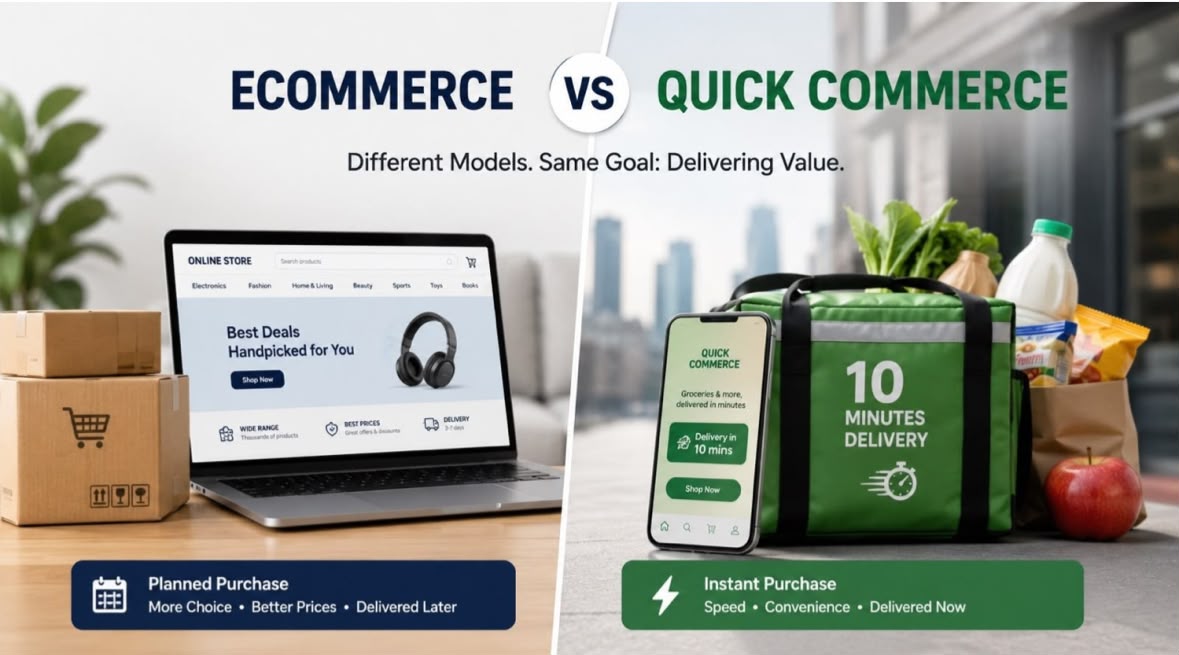
The way people shop has changed dramatically over the last decade. What began with traditional e-commerce has now evolved into quick commerce, where customers expect products to be delivered within minutes rather than days. Businesses that understand this shift and adapt early will gain a significant competitive advantage.
E-commerce focuses on providing customers with a wide range of products through online platforms, offering convenience, competitive pricing, and seamless shopping experiences. Traditional delivery timelines typically range from one to several days, allowing businesses to maintain centralized inventories and serve wider geographic regions.
Successful e-commerce platforms today require features such as personalized recommendations, secure payment gateways, omnichannel integration, inventory management, customer analytics, and AI-powered customer support.
Quick commerce (Q-commerce) takes convenience to the next level. Customers expect groceries, medicines, daily essentials, and even electronics to arrive within 10 to 30 minutes. This model relies on hyperlocal fulfillment centers, real-time inventory tracking, intelligent logistics, and optimized delivery networks.
The rapid growth of quick commerce is redefining customer expectations. Speed is no longer a luxury—it is becoming a core business requirement.
Modern retail platforms are powered by advanced technologies such as:
Artificial Intelligence for recommendations and demand forecasting.
Real-time analytics for inventory and customer behavior.
Mobile-first experiences for seamless shopping journeys.
Cloud infrastructure for scalability and reliability.
Integrated logistics systems for efficient delivery operations.
Automation tools for order processing and customer engagement.
These technologies enable businesses to create unified ecosystems that support both traditional e-commerce and quick commerce models.
Every business operates differently. A fashion retailer, grocery chain, electronics store, and pharmaceutical distributor all have unique operational requirements. Custom-built platforms provide the flexibility to incorporate industry-specific workflows, third-party integrations, personalized customer experiences, and scalable architectures.
Organizations investing in tailored digital solutions are better positioned to respond to market changes and evolving consumer demands.
The future of retail is not about choosing between e-commerce and quick commerce. It is about creating connected, intelligent platforms that deliver exceptional customer experiences regardless of delivery timelines.
Businesses that embrace innovation, leverage data-driven decision-making, and build scalable digital ecosystems will lead the next generation of commerce.
The question is no longer whether to digitize retail operations, but how quickly organizations can adapt to an increasingly fast-moving marketplace.
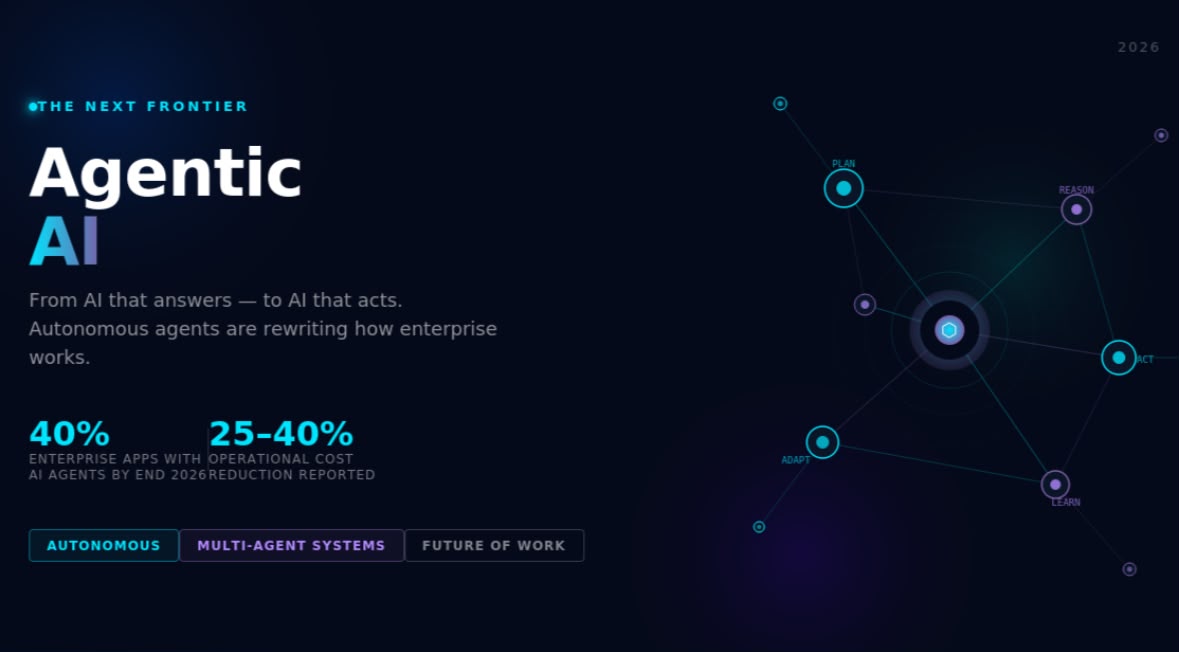
We've spent the last few years marveling at AI that can answer questions, generate code, and write emails. Impressive — but still fundamentally reactive. You prompt it. It responds. You move on.
That era is ending.
What's replacing it is something fundamentally different: Agentic AI — systems that don't wait to be asked. They plan, decide, execute, and learn. On their own.
Most of us have interacted with generative AI — tools like ChatGPT or Copilot that respond to prompts and generate content. Agentic AI is a category shift, not an upgrade.
Where generative AI reacts, agentic AI initiates.
An agentic system has four core capabilities:
Perceive — reads and interprets data from its environment
Reason — breaks down a complex goal into sub-tasks
Act — executes those tasks across tools, APIs, and systems
Learn — refines its approach based on outcomes
The simplest way to think about it: you give it a goal, not a command. And it figures out the rest.
Customer Operations An agentic customer service system doesn't just look up FAQs. It reads the customer's full order history, identifies they're a high-value account, checks return policy, makes an exception decision based on lifetime value, processes the refund, updates the CRM, sends the confirmation email — all without a single human involved.
Finance & Compliance Agents monitor transactions in real time, flag anomalies, cross-reference regulatory frameworks, and generate audit-ready compliance reports autonomously. What used to take a team days now takes minutes.
IT & DevOps Agentic AI handles password resets, software provisioning, and access management while simultaneously monitoring infrastructure, detecting anomalies, and initiating containment responses — often before a human even notices something is wrong.
Supply Chain & Logistics Agents forecast demand, identify vendor risks, re-route shipments, and autonomously renegotiate contracts based on real-time market signals.
Healthcare Clinical AI agents manage scheduling, prior authorizations, patient monitoring, and billing workflows — removing administrative burden from medical staff so they can focus on actual patient care.
Here's what nobody is talking about enough: Agentic AI doesn't just change what gets done — it changes who supervises it.
The emerging model isn't "AI replaces humans." It's humans orchestrating fleets of digital workers.
Your best engineers, analysts, and operators are going to spend less time executing tasks and more time setting goals, defining guardrails, and reviewing exceptions. That's a fundamentally different skill set than what most organizations are training people for today.
The companies winning in this shift aren't just deploying agents — they're building human-AI collaboration models where oversight and trust are designed in from the start.
AI spent the last few years learning to talk. In 2026, it's learning to do.
Agentic AI is not a feature update to existing tools — it's a new operating layer for enterprise work. Organizations that understand this early will build structural advantages. Those that wait and watch will spend the next few years catching up.
The shift from AI as an assistant to AI as an autonomous agent is already underway. The only real question is whether you're architecting for it — or reacting to it.
What's your take — is your organization experimenting with agentic AI yet? Are you excited, cautious, or somewhere in between? Let's discuss in the comments.
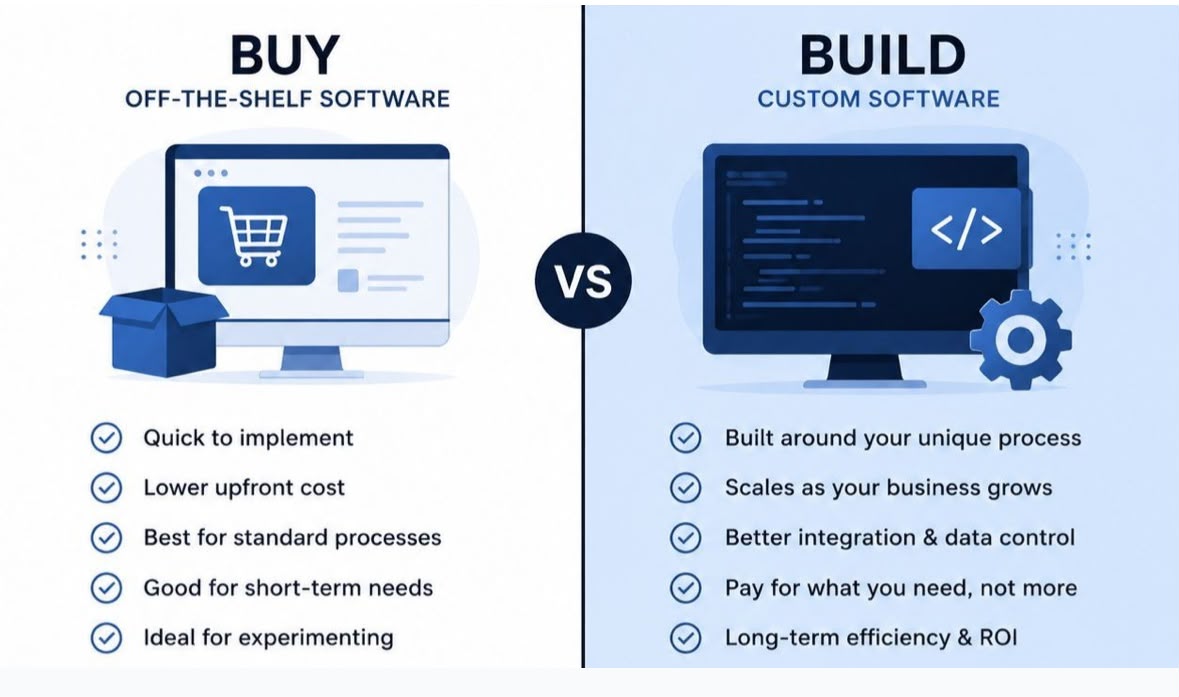
One of the most common decisions businesses face today is simple on the surface—but complex in reality:
There’s no universal answer. But there are clear patterns where custom software becomes the better long-term decision.
Off-the-shelf tools are great when:
Your processes are standard and widely used
You need a quick setup with minimal customization
Budget is limited and time is critical
You’re still experimenting with workflows
In short: speed and cost matter more than flexibility
Custom development becomes valuable when:
1. Your business process is your competitive advantage
If your workflow is unique, forcing it into generic tools slows you down.
2. You are using too many disconnected tools
Multiple subscriptions, manual syncing, and scattered data often cost more in the long run.
3. You are scaling and hitting limitations
What worked for 5 employees often breaks at 50.
4. Data control and integration are critical
Businesses dealing with sensitive operations or multiple systems need centralized control.
5. You are paying for features you don’t use
Most SaaS tools are built for the “average user,” not your specific business.
Buying software looks cheaper upfront. Building software looks expensive upfront.
But the real question is:
What is the cost of inefficiency over the next 3–5 years?
Custom software is not about replacing tools. It’s about building systems that fit your business—not the other way around.
If your operations are becoming complex, it might be time to rethink the “buy everything” approach.
What’s your experience—have you ever moved from a SaaS tool to a custom solution?

Every business reaches a point where growth starts creating complexity.More customers, more data, more communication, more operations — and suddenly, the same manual processes that once worked smoothly start slowing everything down. This is where business automation becomes essential, not optional.
Business automation is the use of technology to execute repetitive business processes with minimal human intervention. It connects systems, workflows, and tools so that tasks happen automatically based on defined rules.
Examples include:
Automatically capturing and assigning leads
Sending follow-up messages to customers
Generating invoices and payment reminders
Updating CRM and reporting dashboards in real time
In simple terms, automation helps businesses run on systems instead of manual effort.
Many businesses still depend heavily on manual work across departments. While this may seem manageable in the early stages, it often leads to:
Delayed responses to customers
Missed sales opportunities due to slow follow-ups
Human errors in data entry and reporting
High dependency on employees for routine tasks
Difficulty scaling operations efficiently
The result is simple: growth becomes harder to manage.
Automation transforms how businesses operate by creating structured, predictable workflows. Instead of isolated tasks, everything becomes a connected system.
Leads no longer sit idle or get lost in spreadsheets. Automation can:
Capture leads from websites, ads, and forms
Instantly assign them to sales teams
Trigger WhatsApp or email responses
Track follow-ups automatically
Customers expect instant engagement. With automation, businesses can:
Send immediate acknowledgements
Set up follow-up sequences
Deliver personalized messages at scale
Ensure no inquiry goes unanswered
Finance processes become faster and more accurate. Automation enables:
Auto-generated invoices
Payment reminders without manual effort
Transaction tracking and reconciliation
Reduced delays in collections
Instead of manually preparing reports:
Dashboards update in real time
Managers receive instant insights
Alerts trigger when action is needed
Data flows automatically between systems
One of the biggest misconceptions about automation is that it replaces jobs. In reality, it does the opposite. Automation:
Removes repetitive and time-consuming tasks
Reduces workload stress on teams
Allows employees to focus on strategy and decision-making
Improves overall productivity and efficiency
It enhances human capability rather than replacing it.
Modern businesses are shifting toward automation because it delivers measurable benefits:
Faster operations
Better customer experience
Reduced operational costs
Fewer errors and inconsistencies
Improved scalability without increasing manpower proportionally
Simply put, automation helps businesses grow smarter, not harder.
The most successful companies are not just people-driven — they are system-driven organizations. They rely on:
Integrated workflows
Automated decision flows
Connected software ecosystems
Real-time data visibility
This shift is what separates scalable businesses from stagnant ones.
Business automation is no longer a luxury or a technical upgrade. It is a core requirement for any company that wants to scale efficiently and sustainably.
The real question is no longer:
“Should we automate?”
It is:
“How fast can we build the right automation systems?”
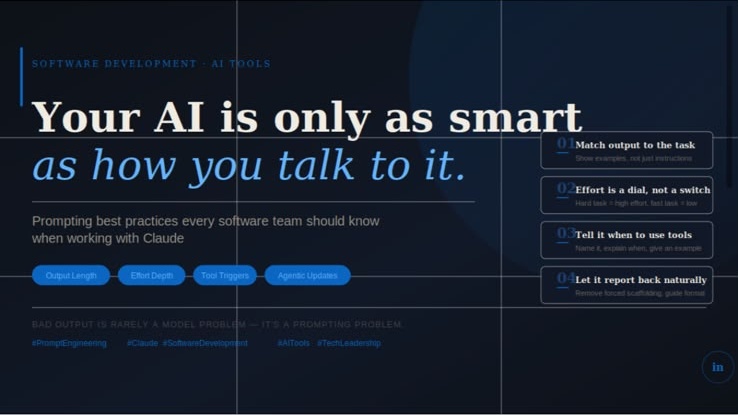
At our company, we’ve spent considerable time integrating Claude into our development workflows. One thing has become very clear: the quality of what you get out is almost entirely determined by the quality of what you put in. Here’s what we’ve learned — without over complicating it.
Claude calibrates its response based on how complex your request is. Ask something simple, you get something short. Ask something open-ended, you get depth. The problem arises when your product or pipeline expects a specific format or length — and you never told the model that.
If you need concise output, say so — explicitly. Don’t just say “be brief.” Show it what brief looks like. A concrete example in your prompt will always outperform a vague instruction. The same goes the other way: if you want detail, describe what that detail should look like.
One of the biggest misconceptions we see in teams just starting with AI is treating it as binary — either it works or it doesn’t. In reality, Claude lets you tune how hard it thinks, and that lever matters enormously for both quality and cost.
For complex, multi-step tasks — code reviews, architecture decisions, deep analysis — you want the model working at high effort. For fast, repetitive, lower-stakes tasks, dial it back. This isn’t just about saving tokens. It’s about getting the right kind of response for the right kind of task.
If Claude is giving you shallow answers on hard problems, the fix usually isn’t rewriting your prompt. It’s telling the model to think harder. And if it’s overthinking simple questions, one sentence in your prompt reminding it to respond directly is often enough.
Claude is increasingly capable of using external tools: searching the web, reading files, querying APIs. But “capable” and “likely to” are very different things. The more reasoning-capable a model becomes, the more it may choose to think through a problem rather than reach for a tool — even when the tool would give a better answer.
The fix is simple: be explicit. Don’t assume Claude knows when to search or when to query your database. Describe the tool clearly, explain the situations where it should be used, and give an example if needed. Vague tool descriptions produce vague tool usage.
In longer agentic workflows — where Claude runs multiple steps, uses tools, and produces outputs across a session — teams often build elaborate scaffolding just to get status updates. Timers. Counters. Forced summaries every N steps.
Newer versions of Claude have gotten significantly better at providing natural, meaningful progress updates on their own. Before you build infrastructure around this problem, try removing it. You may find the model handles it better without the scaffolding than with it.
If the updates still feel off — too long, too short, wrong tone — describe what you want in plain language. Format, frequency, length. Give one example. That’s usually enough.
The teams getting the most out of Claude right now aren’t the ones with the most elaborate prompts. They’re the ones who’ve learned to be specific about what actually matters — and relaxed about everything else.
Write prompts like you’re briefing a smart colleague who doesn’t know your context yet. Clear on the goal. Clear on the constraints. Trust them to figure out the rest.
We’re still learning — but these four shifts have meaningfully changed how our team works with Claude. Hope they’re useful for yours.
